 HostTopPicks
A residential IP VPS is a cloud server whose outbound address is a real consumer ISP address rather than a datacenter IP. Websites and anti-bot systems treat it like a home user, so it is used for ad verification, price monitoring, sneaker/cop workflows, social media account management, market research and streaming that blocks datacenter ranges. These boxes cost more than ordinary VPS because residential addresses are scarce. We compared 11 providers and kept the ones worth ordering. Use them for legitimate automation and research — many sites prohibit automated access.
Best residential IP VPS at a glance
| # | Provider | Entry price | OS | Best for |
|---|---|---|---|---|
| 1 | VoyraCloud | from $12.00/mo | Windows / Linux | Cheapest residential VPS |
| 2 | SpeedRDP | from $13.00/mo | Windows RDP | Budget residential RDP |
| 3 | DashRDP | from $14.00/mo | Windows RDP | German residential RDP |
| 4 | Hostkey | from €15.00/mo | Windows / Linux | European residential VPS |
| 5 | ServerGigabit | from $15.00/mo | Windows / Linux | Mid-range residential VPS |
| 6 | BDWebs | from $16.00/mo | Windows | Residential Windows VPS |
| 7 | IPMela | from $16.00/mo | Windows RDP | Residential RDP |
| 8 | LevaHost | from $17.00/mo | Windows | Mid-premium residential |
| 9 | RDPServerVPS | from $18.00/mo | Windows RDP | Residential RDP specialist |
| 10 | ProxySock | from $19.00/mo | Windows / Linux | Proxy-flavored residential VPS |
| 11 | ResidentialVPS | from $20.00/mo | Windows / Linux | Named specialist |
Datacenter vs residential IP
- Datacenter IPs are flagged. Cloud providers publish their IP ranges, and many sites block or challenge them.
- Residential IPs look like home users. They belong to consumer ISPs (Comcast, Deutsche Telekom, etc.) and pass most anti-bot checks.
- Residential is more expensive and scarcer. Expect $12–20/month versus $5 for a normal VPS.
- Legality and ToS still apply. A residential IP does not let you violate a site's terms. Use it for research, monitoring and legitimate automation.
- Static vs rotating. These VPS give a fixed residential IP. Rotating residential proxies are a different product (billed per GB).
The best residential IP VPS right now
1. VoyraCloud — from $12.00/mo

The cheapest entry on this list — a residential IP VPS provider with Windows and Linux options.
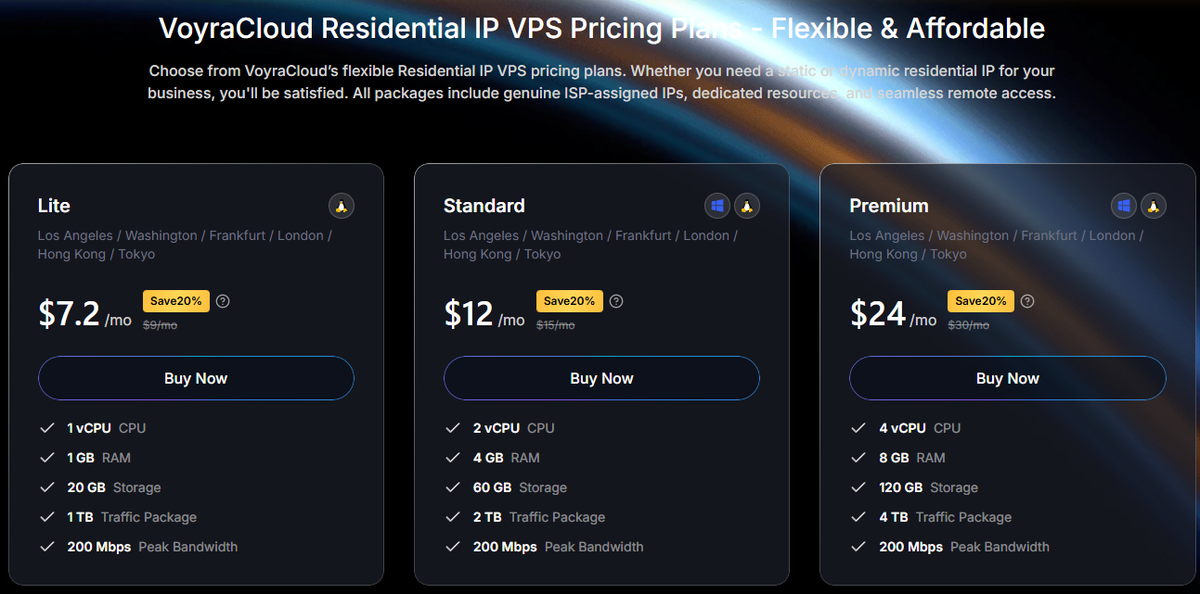
VoyraCloud wins on price. If you want a residential IP VPS at the lowest entry, it is the starting point. As a smaller provider, expect a self-service experience rather than white-glove support.
What we like ✓ Lowest entry price ✓ Windows + Linux
Watch out for ✗ Smaller provider ✗ Self-service
2. SpeedRDP — from $13.00/mo

A budget residential RDP and VPS provider aimed at users who want a Windows desktop on a residential IP.
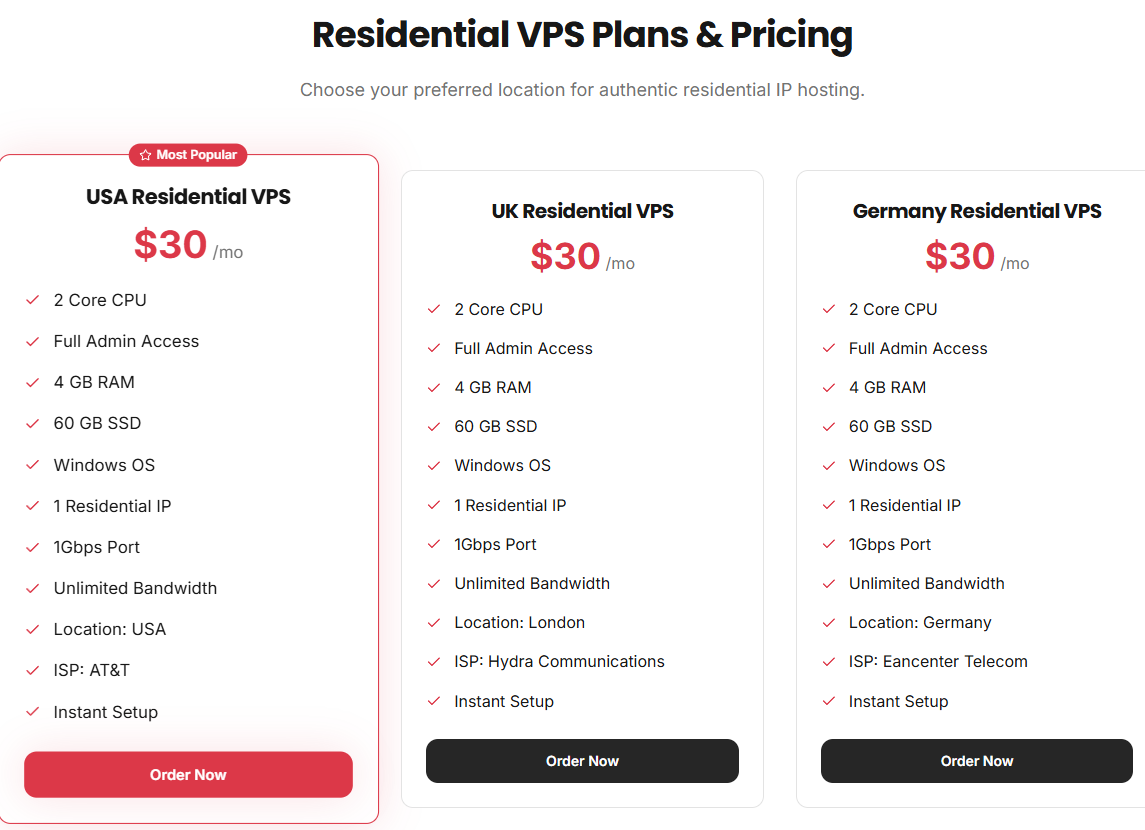
SpeedRDP is a budget residential RDP option. If your workflow needs a Windows remote desktop rather than a Linux box, it is a cheap entry.
What we like ✓ Budget residential RDP ✓ Windows desktop
Watch out for ✗ RDP-focused ✗ Smaller brand
3. DashRDP — from $14.00/mo


DashRDP is a European residential RDP option with German-language ordering. If you need a European residential exit, it is a reasonable mid-budget pick.
What we like ✓ European residential ✓ RDP
Watch out for ✗ Mid-budget price
4. Hostkey — from €15.00/mo

A European hosting company with a dedicated residential IP VPS line.
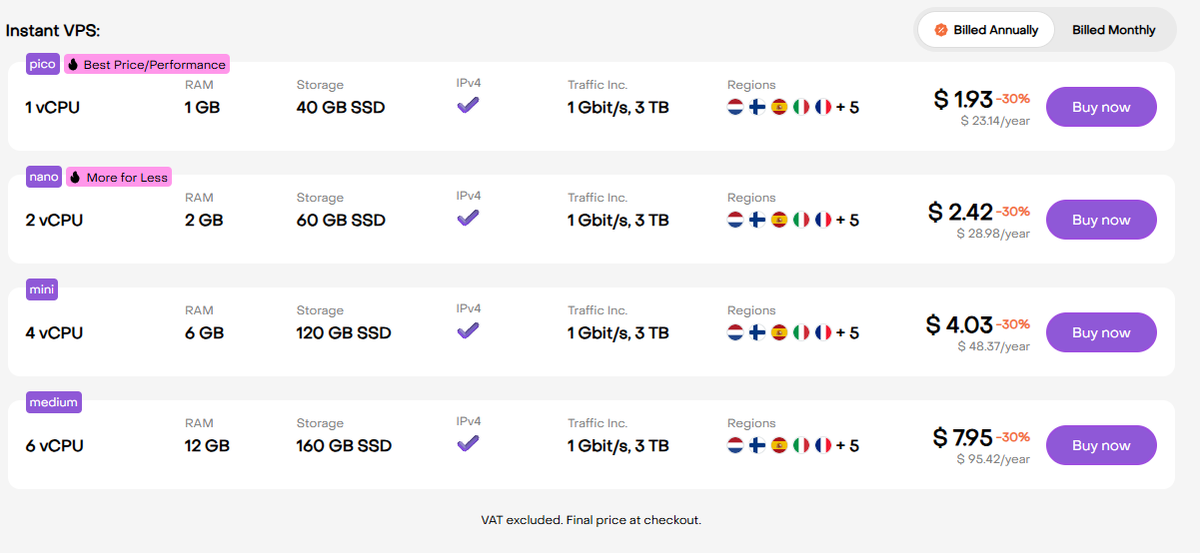
Hostkey is a more established European host that offers residential IP VPS. If you prefer a recognized company over a niche reseller, it is a safer mid-range choice.
What we like ✓ Established European host ✓ Dedicated residential line
Watch out for ✗ Euro pricing ✗ Mid-range
5. ServerGigabit — from $15.00/mo

A residential IP VPS provider in the mid-range of the market.
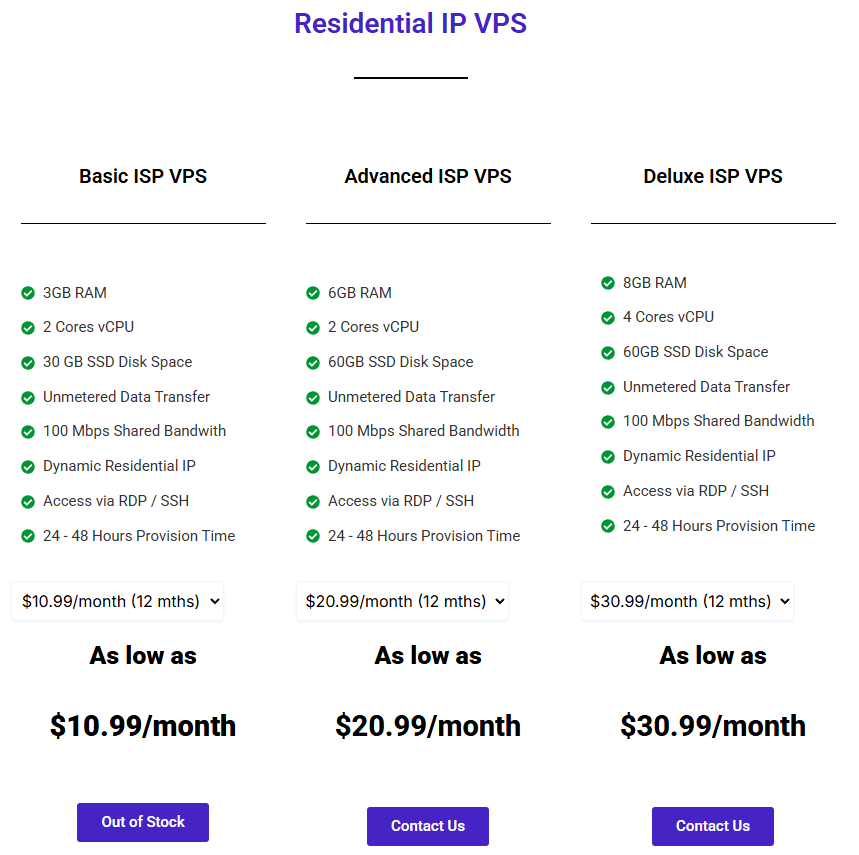
ServerGigabit is a mid-range residential VPS option. It competes on price and features rather than being a standout.
What we like ✓ Mid-range residential VPS
Watch out for ✗ Mid-price ✗ Smaller brand
6. BDWebs — from $16.00/mo


BDWebs offers residential Windows VPS at $16/month. It is a functional mid-range option.
What we like ✓ Residential Windows VPS
Watch out for ✗ Mid-price ✗ Smaller brand
7. IPMela — from $16.00/mo


IPMela is another residential VPS/RDP option at $16/month. It competes in the crowded mid-range.
What we like ✓ Residential VPS + RDP
Watch out for ✗ Mid-price ✗ Crowded market
8. LevaHost — from $17.00/mo


LevaHost sits at the upper-mid end of residential VPS pricing. It is a viable option if cheaper providers are out of stock.
What we like ✓ Residential VPS
Watch out for ✗ Upper-mid price
9. RDPServerVPS — from $18.00/mo


RDPServerVPS is a named residential RDP specialist. If your workflow is specifically a Windows remote desktop on a residential IP, it is a focused option.
What we like ✓ Residential RDP specialist
Watch out for ✗ Upper-mid price
10. ProxySock — from $19.00/mo


ProxySock bridges residential VPS and proxy services. If you come from the proxy world and want a full VPS rather than just an endpoint, it is a recognizable name.
What we like ✓ Proxy heritage ✓ Residential VPS
Watch out for ✗ Upper-mid price
11. ResidentialVPS — from $20.00/mo

The named specialist — a residential VPS provider positioned exactly for this use case.
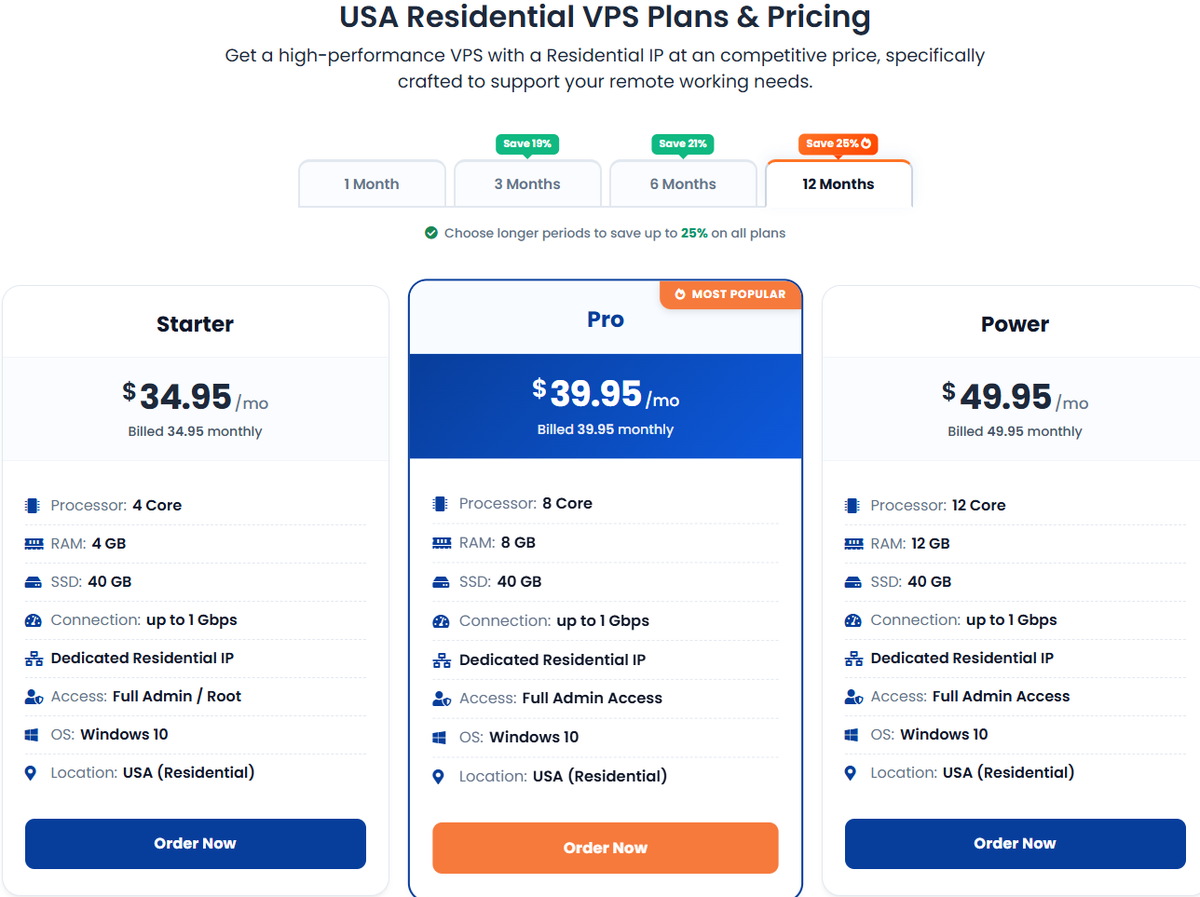
As the name suggests, ResidentialVPS is a pure-play provider. It sits at the top of the price list but is focused entirely on this product rather than bolting it onto a general VPS line.
What we like ✓ Pure-play residential VPS
Watch out for ✗ Most expensive on list
How to choose a residential IP VPS
1. Confirm the IP is genuinely residential. Ask whether it belongs to a consumer ISP and check it on an IP intelligence tool before buying long-term.
2. Match the country to your target. A US residential IP is useless if your target site is in Germany. Pick the provider whose IP country you need.
3. Windows RDP vs Linux. If you need a browser or GUI workflow, choose Windows RDP. For scripts and APIs, Linux is cheaper and lighter.
4. Stay within site terms. A residential IP hides that you are automated, but it does not authorize scraping or multi-accounting against a site's rules.
5. Consider rotating proxies for scale. If you need many IPs rather than one fixed address, a per-GB rotating residential proxy is the better product.
FAQ
What is a residential IP VPS used for?
How is it different from a proxy?
How much does a residential IP VPS cost?
Is a residential IP VPS legal?
Can I get a static residential IP?
What is the cheapest residential IP VPS?
The bottom line
Start from VoyraCloud for the cheapest residential VPS, SpeedRDP or DashRDP if you need a Windows RDP desktop, and Hostkey if you prefer an established European host. Confirm the IP is genuinely residential and the right country before committing. Use these for legitimate research and automation — a residential IP is a tool, not a license to break site terms.